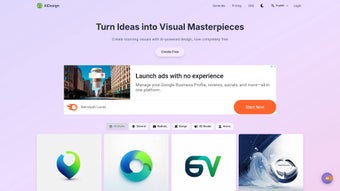

Download AIDesign – AI‑Powered Text‑to‑Image Generator for Creatives
Overview
AIDesign is a web‑based, AI‑driven design tool that converts natural‑language prompts into high‑resolution images in seconds. Launched in early 2024, the platform leverages the latest diffusion models to understand style, composition, and mood, delivering visuals that match professional standards without the need for heavyweight desktop software. Because the entire engine runs in the cloud, users only need a modern browser and a stable internet connection to start creating.
This eliminates the traditional barriers of expensive hardware, lengthy installations, and steep learning curves associated with conventional graphics suites. AIDesign’s core promise is speed: designers, marketers, and content creators can generate concept art, thumbnails, mock‑ups, and even branding assets in under a minute, cutting the early‑stage brainstorming phase by up to 70 %. The service respects user privacy—prompts are processed anonymously, and generated assets are stored only when the user chooses to save them.
Whether you are a freelance illustrator seeking quick inspiration, an agency needing bulk variations for client pitches, or a hobbyist experimenting with visual ideas, AIDesign offers a secure, intuitive, and cost‑effective solution that brings AI‑enhanced creativity to any browser‑enabled device.
Key Features
- Natural‑Language Prompt Engine: Type any description—e.g., “futuristic city at sunset” or “hand‑drawn vintage bicycle”—and receive a ready‑to‑use image.
- Style & Mood Controls: Choose from preset artistic styles such as photorealistic, watercolor, cyberpunk, low‑poly, or fine‑tune brightness, contrast, and color temperature with sliders.
- Resolution Options: Export at 720p, 1080p, or 4K, suitable for social media, presentations, or high‑quality print.
- Batch Generation: Submit up to ten prompts in a single session, receiving a gallery of variations for rapid brainstorming.
- Secure Cloud Processing: All AI computations run on encrypted servers, ensuring intellectual property stays private and GDPR‑compliant.
- Instant Download & Sharing: Download PNG or JPEG files instantly; create shareable links for collaborative review.
- Version History & Revision: The last five versions of each prompt are stored, allowing easy comparison and rollback.
- API Access (Premium): RESTful API lets developers embed the engine into custom workflows, automating image generation at scale.
Beyond the headline capabilities, AIDesign continuously updates its underlying model to incorporate cutting‑edge research in diffusion and transformer architectures. New styles and improvements are released monthly, ensuring that image quality and creative possibilities evolve over time. The user interface is deliberately minimalistic: a left panel for prompt entry, a central canvas for live preview, and a right sidebar for export settings. Users can bookmark favorite outputs, tag images for organization, and request a “refine” operation that re‑runs the model with subtle adjustments based on feedback. All these elements combine to create a powerful yet approachable design experience that feels both modern and familiar.
Installation, Compatibility & Usage Guide
AIDesign requires no traditional installation because it is fully browser‑based. Follow these steps to start creating images in under five minutes, regardless of your operating system:
- Open the Official Site: Navigate to www.aidesign.io using Chrome, Edge, Firefox, Safari, or any modern browser.
- Create an Account: Register with an email address, Google, or Apple ID. A verification email ensures account security.
- Select a Plan: Choose between the free tier (5 images/month, 720p) or paid plans (Starter, Professional, Enterprise) that unlock higher resolutions, batch limits, and API access.
- Enter Your Prompt: Type a clear, descriptive sentence in the prompt box. Example: “A minimalist logo featuring a blue phoenix rising over a sunrise.” Select a style from the dropdown if needed.
- Adjust Settings (Optional): Pick resolution, aspect ratio (1:1, 16:9, 4:3), and style sliders. The real‑time preview updates instantly.
- Generate & Refine: Click “Generate.” Results typically appear within 10‑20 seconds. Use the “Refine” button for iterative improvements.
- Download or Share: Save the PNG/JPEG file, copy a shareable link, or send directly to Slack, Teams, or email via built‑in integrations.
AIDesign works on Windows 10/11, macOS Monterey+, Linux distributions (Ubuntu, Fedora, etc.), Android 10+, and iOS 14+. Because processing occurs in the cloud, local hardware requirements are minimal—only a stable internet connection (≥5 Mbps) and a device capable of rendering HTML5 Canvas elements are needed. Performance scales with network latency: 1080p images generate in ~12 seconds, while 4K outputs may take up to 25 seconds on average broadband. Enterprise customers can request dedicated server clusters for sub‑5‑second responses even under heavy load.
Power users can access the “Advanced” tab to retrieve API keys, configure webhooks, and set custom model parameters. The platform also includes a concise tutorial video and a comprehensive knowledge base covering prompt‑engineering best practices, ensuring users extract maximum value from the AI engine.
Pros, Cons & Frequently Asked Questions
Pros
- Instant, high‑quality image generation from simple text.
- Extensive style library and resolution options.
- No installation—runs on any modern browser.
- Secure, GDPR‑compliant cloud processing.
- Free tier available for casual users.
- Robust API for developers and agencies.
- Regular model updates keep output fresh.
Cons
- Free plan limits monthly image count.
- 4K generation can be slower on weak connections.
- Complex prompts may need iterative refinement.
- Requires internet connectivity; offline work isn’t possible.
FAQ
Is AIDesign really free to use?
Yes. The free tier provides up to five image generations per month at 720p resolution, perfect for testing the platform or occasional personal projects.
Can I use generated images for commercial purposes?
Paid‑plan users receive full commercial rights to all downloaded images. Free‑tier assets are limited to personal or non‑commercial use only.
How does AIDesign protect my privacy?
All data transfers use TLS 1.3 encryption, prompts are processed anonymously, and no personal data is stored unless you explicitly save it to your account. The service complies with GDPR and CCPA.
Is there an API for integrating AIDesign into my workflow?
Yes. Professional and Enterprise plans include a RESTful API that allows programmatic prompt submission, image retrieval, and usage‑quota management.
What file formats can I download?
Images are available as lossless PNG or compressed JPEG, both retaining the selected resolution.
Overall Rating: 4.5 / 5
The blend of ease‑of‑use, powerful AI, and cross‑platform accessibility makes AIDesign a standout tool for anyone needing fast visual content. While the free tier is modest and high‑resolution output can be slower on weak networks, the benefits far outweigh these minor drawbacks.
Conclusion & Call to Action
In a market crowded with heavyweight design suites and costly stock‑image subscriptions, AIDesign provides a refreshing, browser‑based alternative that turns simple sentences into polished visuals within seconds. Its intuitive interface, extensive style options, and secure cloud processing make it suitable for freelancers, agencies, and large enterprises alike. By automating the early‑stage brainstorming process, AIDesign not only slashes production time but also unlocks creative avenues that would otherwise require a dedicated illustrator.
Ready to accelerate your visual workflow? Sign up for the free plan today or upgrade to a paid subscription for premium resolutions, batch generation, and API access. Your next stunning image is just a prompt away.



.png)



